
说明
本文是个人学习用的非官方中英对照译文,原文:https://diveintosystems.org/book/C1-C_intro/getting_started.html。
原书采用 CC BY-NC-ND 4.0 许可(禁止演绎),请勿公开传播本译文。
标为「译注」「现代更新」的内容是译者补充,不代表原书作者观点;代码与原文逐字一致,未作改动。
1.1. Getting Started Programming in C
我们先来看一个 “hello world” 程序,其中还演示了如何调用数学库中的函数。在表 1中,我们把这个程序的 C 版本与 Python 版本作对比。C 版本可以放在名为 hello.c 的文件中(.c 是 C 源代码文件的惯用后缀),而 Python 版本可以放在名为 hello.py 的文件中。
Let’s start by looking at a “hello world” program that includes an example of calling a function from the math library. In Table 1 we compare the C version of this program to the Python version. The C version might be put in a file named
hello.c(.cis the suffix convention for C source code files), whereas the Python version might be in a file namedhello.py.
表 1. 同一个小程序在 Python 和 C 中的语法对比。C 版本和 Python 版本均可下载。
Table 1. Syntax Comparison of a Small Program in Python and C. Both the C version and Python version are available for download.
Python 版本(hello.py)
Python version (hello.py)
1 | ''' |
C 版本(hello.c)
C version (hello.c)
1 | /* |
注意,这个程序的两个版本结构相似,语言构造也相似,只是语法不同。具体来说:
Notice that both versions of this program have similar structure and language constructs, albeit with different language syntax. In particular:
注释:
Comments:
- 在 Python 中,多行注释以
'''开始和结束,单行注释以#开头。
- In Python, multiline comments begin and end with
''', and single-line comments begin with#.
- 在 C 中,多行注释以
/*开始、以*/结束,单行注释以//开头。
- In C, multiline comments begin with
/*and end with*/, and single-line comments begin with//.
导入库代码:
Importing library code:
- 在 Python 中,用
import引入(导入)库。
- In Python, libraries are included (imported) using
import.
- 在 C 中,用
#include引入(导入)库。所有#include语句都出现在程序的开头,位于函数体之外。
- In C, libraries are included (imported) using
#include. All#includestatements appear at the top of the program, outside of function bodies.
代码块:
Blocks:
- 在 Python 中,缩进表示一个代码块。
- In Python, indentation denotes a block.
- 在 C 中,代码块(例如函数体、循环体和条件语句体)以
{开始、以}结束。
- In C, blocks (for example, function, loop, and conditional bodies) start with
{and end with}.
main 函数:
The main function:
- 在 Python 中,
def main():定义 main 函数。
- In Python,
def main():defines the main function.
- 在 C 中,
int main(void){ }定义 main 函数。main函数返回一个int类型的值,int是 C 中有符号整数类型的名称(有符号整数是 -3、0、1234 这样的值)。main函数返回int值 0,表示程序顺利运行结束、没有出错。void表示它不接收参数。后面的小节会介绍main如何通过参数接收命令行参数。
- In C,
int main(void){ }defines the main function. Themainfunction returns a value of typeint, which is C’s name for specifying the signed integer type (signed integers are values like -3, 0, 1234). Themainfunction returns theintvalue 0 to signify running to completion without error. Thevoidmeans it doesn’t expect to receive a parameter. Future sections show howmaincan take parameters to receive command line arguments.
语句:
Statements:
- 在 Python 中,每条语句单独占一行。
- In Python, each statement is on a separate line.
- 在 C 中,每条语句以分号
;结尾。在 C 中,语句必须位于某个函数的函数体内(在本例中是main)。
- In C, each statement ends with a semicolon
;. In C, statements must be within the body of some function (inmainin this example).
输出:
Output:
- 在 Python 中,
print函数打印格式化字符串。格式字符串中占位符对应的值放在%符号后面,是一个以逗号分隔的值列表(例如,sqrt(4)的值会打印在格式字符串中%f占位符的位置)。
- In Python, the
%symbol in a comma-separated list of values (for example, the value ofsqrt(4)will be printed in place of the%fplaceholder in the format string).
- 在 C 中,
printf函数打印格式化字符串。格式字符串中占位符对应的值作为额外的参数、以逗号分隔传入(例如,sqrt(4)的值会打印在格式字符串中%f占位符的位置)。
- In C, the
printffunction prints a formatted string. Values for the placeholders in the format string are additional arguments separated by commas (for example, the value ofsqrt(4)will be printed in place of the%fplaceholder in the format string).
这个程序的 C 版本和 Python 版本有几处重要区别需要注意:
There are a few important differences to note in the C and Python versions of this program:
缩进:在 C 中,缩进没有语法意义,但按照语句所在代码块的嵌套层次来缩进,是良好的编程风格。
Indentation: In C, indentation doesn’t have meaning, but it’s good programming style to indent statements based on the nested level of their containing block.
输出:C 的 printf 函数不会像 Python 的 print 函数那样自动在末尾输出换行符。因此,当需要在输出中换行时,C 程序员需要在格式字符串中显式写出换行符(\n)。
Output: C’s
printffunction doesn’t automatically print a newline character at the end like Python’s\n) in the format string when a newline is desired in the output.
main 函数:
mainfunction:
- C 程序必须有一个名为
main的函数,且其返回类型必须是int。这意味着main函数返回一个有符号整数类型的值。Python 程序不必把主函数命名为main,但按惯例通常会这样命名。
- A C program must have a function named
main, and its return type must beint. This means that themainfunction returns a signed integer type value. Python programs don’t need to name their main functionmain, but they often do by convention.
- C 的
main函数有一条显式的return语句来返回一个int值(按惯例,如果 main 函数成功执行、没有出错,main应当返回0)。
- The C
mainfunction has an explicitreturnstatement to return anintvalue (by convention,mainshould return0if the main function is successfully executed without errors).
- Python 程序需要显式调用它的
main函数,程序执行时才会运行它。而在 C 中,C 程序执行时会自动调用main函数。
- A Python program needs to include an explicit call to its
mainfunction to run it when the program executes. In C, itsmainfunction is automatically called when the C program executes.
1.1.1. 编译和运行 C 程序
1.1.1. Compiling and Running C Programs
Python 是一种解释型编程语言,也就是说,Python 程序由另一个程序——Python 解释器——来运行:Python 解释器就像一台虚拟机,Python 程序在它上面运行。要运行一个 Python 程序,就把程序源代码(hello.py)作为输入交给 Python 解释器程序,由它来运行。例如($ 是 Linux shell 的提示符):
Python is an interpreted programming language, which means that another program, the Python interpreter, runs Python programs: the Python interpreter acts like a virtual machine on which Python programs are run. To run a Python program, the program source code (
hello.py) is given as input to the Python interpreter program that runs it. For example ($is the Linux shell prompt):
现代更新(截至 2026-11)· 用 python3 而不是 python
Python 2 已于 2020 年 1 月 1 日停止维护(不再修复任何问题,包括安全漏洞)。如今许多 Linux 发行版和 macOS 默认只提供 python3 命令,书中的 python hello.py 在这些系统上应写作 python3 hello.py。Python.org:Sunsetting Python 2
1 | $ python hello.py |
Python 解释器是一个可以直接在底层系统上运行的程序(这种形式称为二进制可执行文件,binary executable),它把要运行的 Python 程序作为输入(图 1)。
The Python interpreter is a program that is in a form that can be run directly on the underlying system (this form is called binary executable) and takes as input the Python program that it runs (Figure 1).
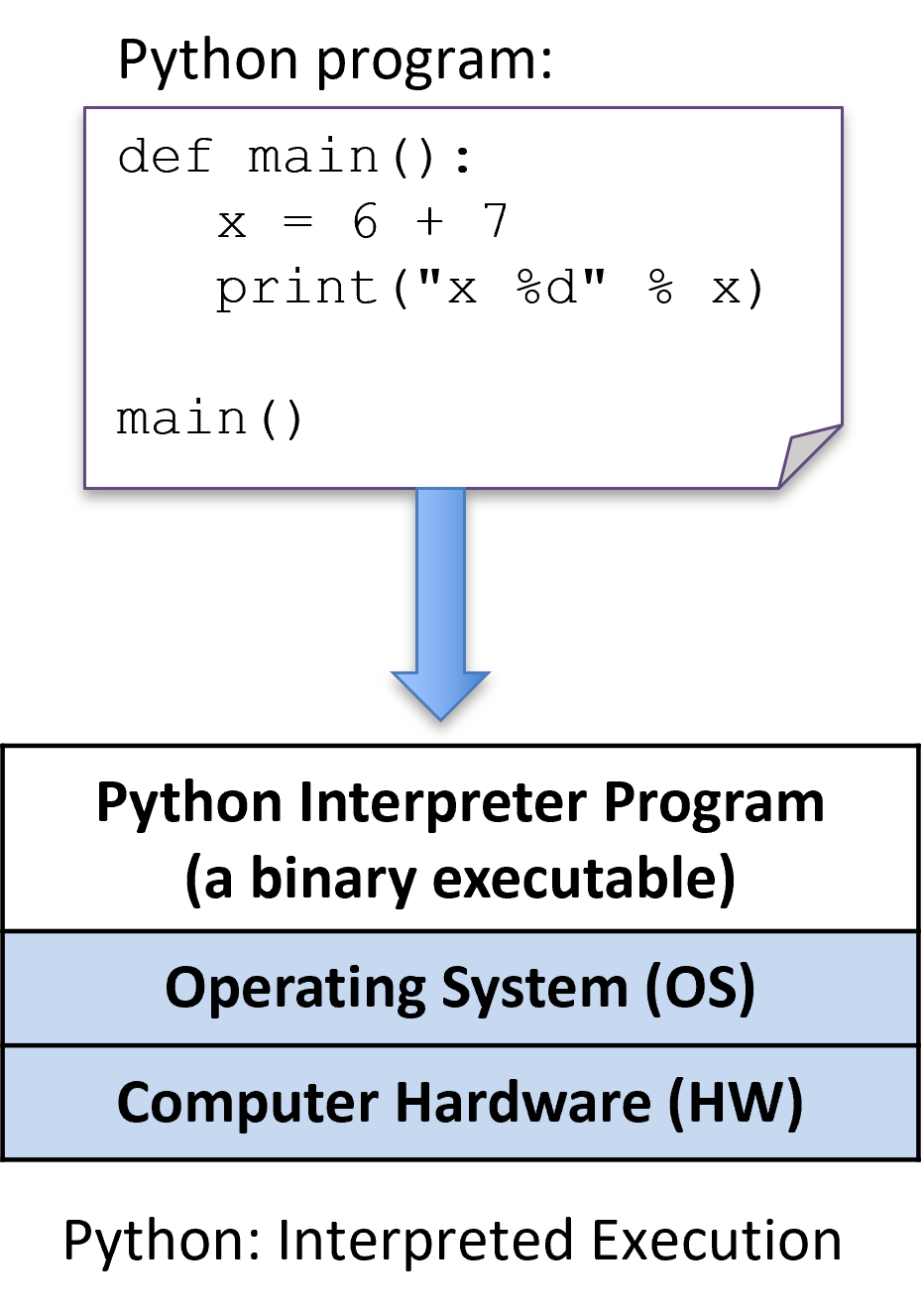
图 1. Python 程序由 Python 解释器直接执行,而 Python 解释器本身是一个运行在底层系统(操作系统和硬件)上的二进制可执行程序
Figure 1. A Python program is directly executed by the Python interpreter, which is a binary executable program that is run on the underlying system (OS and hardware)
要运行 C 程序,必须先把它翻译成计算机系统可以直接执行的形式。C 编译器(compiler)是一个程序,它把 C 源代码翻译成计算机硬件可以直接执行的二进制可执行形式。二进制可执行文件由一系列 0 和 1 组成,采用计算机能够运行的明确定义的格式。
To run a C program, it must first be translated into a form that a computer system can directly execute. A C compiler is a program that translates C source code into a binary executable form that the computer hardware can directly execute. A binary executable consists of a series of 0’s and 1’s in a well-defined format that a computer can run.
例如,要在 Unix 系统上运行 C 程序 hello.c,首先要用 C 编译器(例如 GNU C 编译器 GCC)编译 C 代码,生成一个二进制可执行文件(默认名为 a.out)。然后就可以在系统上直接运行这个二进制可执行版本的程序(图 2):
For example, to run the C program
hello.con a Unix system, the C code must first be compiled by a C compiler (for example, the GNU C compiler, GCC) that produces a binary executable (by default nameda.out). The binary executable version of the program can then be run directly on the system (Figure 2):
译注 · Mac 上的 gcc 其实是 clang
在 macOS 上,装好 Xcode 命令行工具后输入的 gcc 实际调用的是苹果的 Clang 编译器:运行 gcc --version 会显示 Apple clang version ...,目标平台是 arm64-apple-darwin。本书前几章的 C 代码用 Clang 编译基本没有区别;但第 7、8 章的 x86 汇编输出、第 3 章的 GDB/Valgrind 在 Apple Silicon Mac 上无法直接复现(macOS 上对应的调试器是 LLDB),建议准备一个 x86_64 Linux 环境(虚拟机、容器或远程服务器)。
1 | $ gcc hello.c |
(注意,有些 C 编译器可能需要显式告诉它链接数学库:-lm):
(Note that some C compilers might need to be explicitly told to link in the math library:
-lm):
1 | $ gcc hello.c -lm |
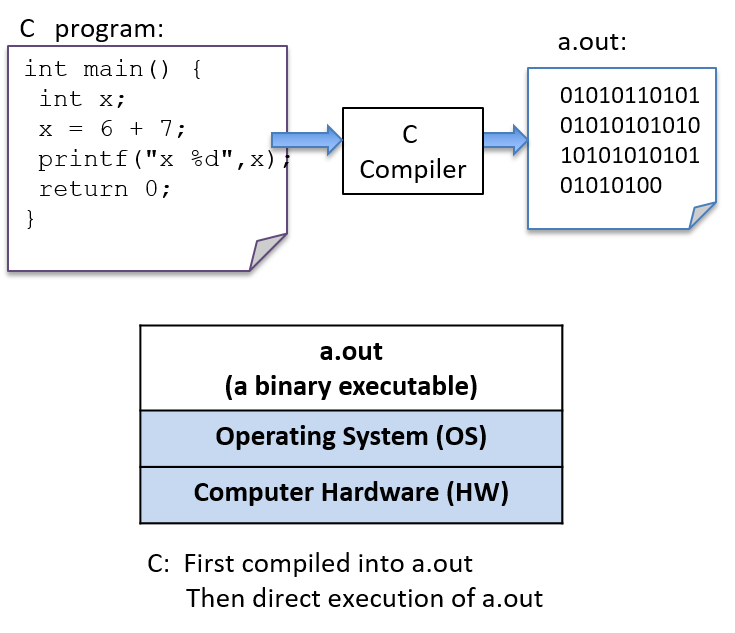
图 2. C 编译器(gcc)把 C 源代码构建成二进制可执行文件(a.out)。底层系统(操作系统和硬件)直接执行 a.out 文件来运行程序。
Figure 2. The C compiler (gcc) builds C source code into a binary executable file (a.out). The underlying system (OS and hardware) directly executes the a.out file to run the program.
详细步骤
Detailed Steps
一般来说,在 Unix 系统上编辑、编译和运行 C 程序需要以下步骤:
In general, the following sequence describes the necessary steps for editing, compiling, and running a C program on a Unix system:
用文本编辑器(例如
vim)编写 C 源程序,并把它保存到一个文件中(例如hello.c):1
$ vim hello.c
Using a text editor (for example,
vim), write and save your C source code program in a file (e.g.,hello.c):
把源代码编译成可执行形式,然后运行它。用
gcc编译的最基本语法是:1
$ gcc <input_source_file>
Compile the source to an executable form, and then run it. The most basic syntax for compiling with
gccis:
如果编译没有出错,编译器会生成一个名为 a.out 的二进制可执行文件。编译器也允许你用 -o 标志指定要生成的二进制可执行文件的名字:
If compilation yields no errors, the compiler creates a binary executable file named
a.out. The compiler also allows you to specify the name of the binary executable file to generate using the-oflag:
1 | $ gcc -o <output_executable_file> <input_source_file> |
例如,下面这条命令让 gcc 把 hello.c 编译成名为 hello 的可执行文件:
For example, this command instructs
gccto compilehello.cinto an executable file namedhello:
1 | $ gcc -o hello hello.c |
我们可以用 ./hello 来运行这个可执行程序:
We can invoke the executable program using
./hello:
1 | $ ./hello |
对 C 源代码(hello.c 文件)的任何修改,都必须用 gcc 重新编译,才能生成新版本的 hello。如果编译器在编译过程中发现任何错误,就不会创建(或重新创建)./hello 文件(但要当心:之前某次成功编译生成的旧版本文件可能还在)。
Any changes made to the C source code (the
hello.cfile) must be recompiled withgccto produce a new version ofhello. If the compiler detects any errors during compilation, the./hellofile won’t be created/re-created (but beware, an older version of the file from a previous successful compilation might still exist).
用 gcc 编译时,常常需要加上几个命令行选项。例如,下面这些选项会启用更多的编译器警告,并生成带有额外调试信息的二进制可执行文件:
Often when compiling with
gcc, you want to include several command line options. For example, these options enable more compiler warnings and build a binary executable with extra debugging information:
1 | $ gcc -Wall -g -o hello hello.c |
由于 gcc 命令行可能很长,人们常用 make 工具来简化 C 程序的编译,并清理 gcc 生成的文件。随着 C 语言编程经验的积累,使用 make 和编写 Makefile 会成为你掌握的重要技能。
Because the
gcccommand line can be long, frequently themakeutility is used to simplify compiling C programs and for cleaning up files created bygcc. Using make and writing Makefiles are important skills that you will develop as you build up experience with C programming.
我们会在第 2 章末尾更详细地介绍编译以及与 C 库代码的链接。
We cover compiling and linking with C library code in more detail at the end of Chapter 2.
1.1.2. 变量与 C 的数值类型
1.1.2. Variables and C Numeric Types
和 Python 一样,C 用变量作为存放数据的具名存储位置。想清楚程序变量的作用域(scope)和类型(type),对于理解程序运行时会做什么非常重要。变量的作用域决定了变量在什么时候有意义(也就是它可以在程序的什么地方、什么时候使用),以及它的生命周期(也就是它可能在整个程序运行期间一直存在,也可能只在某次函数调用期间存在)。变量的类型决定了它能表示的值的范围,以及在对其数据进行运算时如何解释这些值。
Like Python, C uses variables as named storage locations for holding data. Thinking about the scope and type of program variables is important to understand the semantics of what your program will do when you run it. A variable’s scope defines when the variable has meaning (that is, where and when in your program it can be used) and its lifetime (that is, it could persist for the entire run of a program or only during a function activation). A variable’s type defines the range of values that it can represent and how those values will be interpreted when performing operations on its data.
在 C 中,所有变量都必须先声明后使用。声明变量的语法如下:
In C, all variables must be declared before they can be used. To declare a variable, use the following syntax:
1 | type_name variable_name; |
一个变量只能有一种类型。C 的基本类型包括 char、int、float 和 double。按照惯例,C 变量应当在其作用域的开头(即 { } 代码块的顶部)声明,位于该作用域中的所有 C 语句之前。
A variable can have only a single type. The basic C types include
char,int,float, anddouble. By convention, C variables should be declared at the beginning of their scope (at the top of a{ }block), before any C statements in that scope.
下面的 C 代码片段示范了几种不同类型变量的声明和使用。示例之后我们会更详细地讨论类型和运算符。
Below is an example C code snippet that shows declarations and uses of variables of some different types. We discuss types and operators in more detail after the example.
vars.c
vars.c
1 | { |
注意那多如牛毛的分号。回想一下,C 语句是用 ; 而不是换行来分隔的——C 要求每条语句后面都有分号。你一定会漏掉一些,而 gcc 几乎从不直接告诉你漏了分号,即使那可能是你程序中唯一的语法错误。事实上,漏了分号时,编译器通常会在漏分号那一行的下一行报语法错误,原因是 gcc 把下一行当成了上一行语句的一部分。随着 C 编程经验的增加,你会学会把 gcc 的报错与它所描述的具体 C 语法错误对应起来。
Note the semicolons galore. Recall that C statements are delineated by
;, not line breaks — C expects a semicolon after every statement. You’ll forget some, andgccalmost never informs you that you missed a semicolon, even though that might be the only syntax error in your program. In fact, often when you forget a semicolon, the compiler indicates a syntax error on the line after the one with the missing semicolon: the reason is thatgccinterprets it as part of the statement from the previous line. As you continue to program in C, you’ll learn to correlategccerrors with the specific C syntax mistakes that they describe.
译注
现在的 GCC 和 Clang 在这方面已经友好得多:漏掉分号时,它们一般会直接报 expected ';' after expression 之类的错误,并指出应插入分号的位置。不过「报错位置在下一行」这个现象依然常见,看到莫名其妙的语法错误时,先检查上一行。
1.1.3. C 的类型
1.1.3. C Types
C 支持一小组内置数据类型,并提供了几种让程序员构造基本类型集合的方式(数组和结构体)。C 程序员可以用这些基本构件搭建出复杂的数据结构。
C supports a small set of built-in data types, and it provides a few ways in which programmers can construct basic collections of types (arrays and structs). From these basic building blocks, a C programmer can build complex data structures.
C 定义了一组用于存储数值的基本类型。下面是几种不同 C 类型的数值字面量示例:
C defines a set of basic types for storing numeric values. Here are some examples of numeric literal values of different C types:
1 | 8 // the int value 8 |
C 的 char 类型存储的是一个数值,但程序员常用它来存储一个 ASCII 字符的值。在 C 中,字符字面量写作单引号括起来的单个字符。
The C
chartype stores a numeric value. However, it’s often used by programmers to store the value of an ASCII character. A character literal value is specified in C as a single character between single quotes.
C 不支持字符串类型,但程序员可以利用 char 类型和 C 对构造数组的支持来创建字符串,我们会在后面的小节中讨论。不过,C 确实支持在程序中表示字符串字面量:字符串字面量就是双引号括起来的任意字符序列。C 程序员经常把字符串字面量作为格式字符串参数传给 printf:
C doesn’t support a string type, but programmers can create strings from the
chartype and C’s support for constructing arrays of values, which we discuss in later sections. C does, however, support a way of expressing string literal values in programs: a string literal is any sequence of characters between double quotes. C programmers often pass string literals as the format string argument toprintf:
1 | printf("this is a C string\n"); |
Python 支持字符串,但没有 char 类型。在 C 中,字符串和 char 是截然不同的两种类型,求值结果也不同。对比只含一个字符的 C 字符串字面量和 C 的 char 字面量,就能看出这种区别。例如:
Python supports strings, but it doesn’t have a
chartype. In C, a string and acharare two very different types, and they evaluate differently. This difference is illustrated by contrasting a C string literal that contains one character with a Ccharliteral. For example:
1 | 'h' // this is a char literal value (its value is 104, the ASCII value of h) |
我们会在本章后面的字符串一节中更详细地讨论 C 字符串和 char 变量。这里主要关注 C 的数值类型。
We discuss C strings and
charvariables in more detail in the Strings section later in this chapter. Here, we’ll mainly focus on C’s numeric types.
C 的数值类型
C Numeric Types
C 支持多种不同的类型来存储数值,它们的区别在于所表示数值的格式。例如,float 和 double 类型可以表示实数,int 表示有符号整数,unsigned int 表示无符号整数。实数是带小数点的正值或负值,例如 -1.23 或 0.0056。有符号整数存储正整数、负整数或零,例如 -333、0 或 3456。无符号整数只存储非负整数,例如 0 或 1234。
C supports several different types for storing numeric values. The types differ in the format of the numeric values they represent. For example, the
floatanddoubletypes can represent real values,intrepresents signed integer values, andunsigned intrepresents unsigned integer values. Real values are positive or negative values with a decimal point, such as-1.23or0.0056. Signed integers store positive, negative, or zero integer values, such as-333,0, or3456. Unsigned integers store strictly nonnegative integer values, such as0or1234.
C 的各种数值类型能表示的值的范围和精度也不同。一个值的范围或精度取决于其类型所占的字节数。字节数多的类型,比字节数少的类型能表示更大范围的值(对整数类型而言)或更高精度的值(对实数类型而言)。
C’s numeric types also differ in the range and precision of the values they can represent. The range or precision of a value depends on the number of bytes associated with its type. Types with more bytes can represent a larger range of values (for integer types), or higher-precision values (for real types), than types with fewer bytes.
表 2 列出了多种常见 C 数值类型的存储字节数、所存数值的种类,以及如何声明该类型的变量(注意这些是典型大小——确切的字节数取决于硬件体系结构)。
Table 2 shows the number of storage bytes, the kind of numeric values stored, and how to declare a variable for a variety of common C numeric types (note that these are typical sizes — the exact number of bytes depends on the hardware architecture).
表 2. C 的数值类型
Table 2. C Numeric Types
| 类型名 | 通常大小 | 存储的值 | 声明方式 |
|---|---|---|---|
char |
1 字节 | 整数 | char x; |
short |
2 字节 | 有符号整数 | short x; |
int |
4 字节 | 有符号整数 | int x; |
long |
4 或 8 字节 | 有符号整数 | long x; |
long long |
8 字节 | 有符号整数 | long long x; |
float |
4 字节 | 有符号实数 | float x; |
double |
8 字节 | 有符号实数 | double x; |
Type name Usual size Values stored How to declare char1 byte integers char x;short2 bytes signed integers short x;int4 bytes signed integers int x;long4 or 8 bytes signed integers long x;long long8 bytes signed integers long long x;float4 bytes signed real numbers float x;double8 bytes signed real numbers double x;
译注 · long 到底几个字节
long 的大小取决于平台的数据模型:64 位 Linux 和 macOS(包括 Apple Silicon)采用 LP64 模型,long 和指针都是 8 字节;64 位 Windows 采用 LLP64 模型,long 仍是 4 字节,只有 long long 和指针是 8 字节。需要确定宽度的整数时,可以用 <stdint.h> 里的 int32_t、uint64_t 等类型。
C 还为整数类型(char、short、int、long 和 long long)提供了无符号版本。要把变量声明为无符号的,在类型名前加上关键字 unsigned 即可。例如:
C also provides unsigned versions of the integer numeric types (
char,short,int,long, andlong long). To declare a variable as unsigned, add the keywordunsignedbefore the type name. For example:
1 | int x; // x is a signed int variable |
C 标准并没有规定 char 类型是有符号还是无符号的。因此,有些实现可能把 char 实现为有符号整数,有些则实现为无符号整数。如果你想使用无符号的 char 变量,好的编程习惯是显式声明为 unsigned char。
The C standard doesn’t specify whether the
chartype is signed or unsigned. As a result, some implementations might implementcharas signed integer values and others as unsigned. It’s good programming practice to explicitly declareunsigned charif you want to use the unsigned version of acharvariable.
译注
一个具体例子:在 x86_64 Linux 上,char 默认是有符号的;在 ARM64 Linux 上,char 默认是无符号的;而苹果的 ARM64 平台明确规定 char 为有符号类型(Apple:Writing ARM64 code for Apple platforms)。可以用 clang --target=aarch64-linux-gnu -E -dM -x c /dev/null | grep CHAR_UNSIGNED 自己验证:只有 ARM64 Linux 目标会定义 __CHAR_UNSIGNED__。同一段依赖 char 符号性的代码,在不同平台上可能得出不同结果。
各个 C 类型的确切字节数可能因体系结构而异。表 2 中的大小是各类型的最小(也是常见)大小。你可以用 C 的 sizeof 运算符打印出某台机器上的确切大小:sizeof 以类型名为参数,求值结果是存储该类型所用的字节数。例如:
The exact number of bytes for each of the C types might vary from one architecture to the next. The sizes in Table 2 are minimum (and common) sizes for each type. You can print the exact size on a given machine using C’s
sizeofoperator, which takes the name of a type as an argument and evaluates to the number of bytes used to store that type. For example:
1 | printf("number of bytes in an int: %lu\n", sizeof(int)); |
sizeof 运算符的求值结果是一个 unsigned long 值,所以在调用 printf 时要用占位符 %lu 来打印它。在大多数体系结构上,这些语句的输出是:
The
sizeofoperator evaluates to an unsigned long value, so in the call toprintf, use the placeholder%luto print its value. On most architectures the output of these statements will be:
译注 · %lu 与 %zu
严格地说,sizeof 的结果类型是 size_t,它是一种无符号整数类型,但不一定就是 unsigned long(例如在 64 位 Windows 上 size_t 是 64 位,unsigned long 却是 32 位)。自 C99 起,打印 size_t 的标准写法是 %zu(z 长度修饰符,见 cppreference:printf)。在 64 位 Linux/macOS 上两者恰好一致,所以书中写法也能正常工作。
1 | number of bytes in an int: 4 |
算术运算符
Arithmetic Operators
算术运算符把数值类型的值组合起来。运算结果的类型取决于操作数的类型。例如,如果用算术运算符组合两个 int 值,结果的类型也是整数。
Arithmetic operators combine values of numeric types. The resulting type of the operation is based on the types of the operands. For example, if two
intvalues are combined with an arithmetic operator, the resulting type is also an integer.
当运算符组合两种不同类型的操作数时,C 会进行自动类型转换。例如,如果把一个 int 操作数与一个 float 操作数组合,整数操作数会先被转换为等价的浮点值,然后再执行运算,运算结果的类型是 float。
C performs automatic type conversion when an operator combines operands of two different types. For example, if an
intoperand is combined with afloatoperand, the integer operand is first converted to its floating-point equivalent before the operator is applied, and the type of the operation’s result isfloat.
以下算术运算符可用于大多数数值类型的操作数:
The following arithmetic operators can be used on most numeric type operands:
- 加(
+)和减(-)
- add (
+) and subtract (-)
乘(
*)、除(/)和取模(%):取模运算符(
%)只能用于整数类型的操作数(int、unsigned int、short等)。如果两个操作数都是
int类型,除法运算符(/)执行整数除法(结果是int,除法结果中小数点之后的部分被截断)。例如8/3的结果是2。如果有一个或两个操作数是
float(或double),/执行实数除法,结果为float(或double)。例如,8 / 3.0的结果约为2.666667。
multiply (
*), divide (/), and mod (%):The mod operator (
%) can only take integer-type operands (int,unsigned int,short, and so on).If both operands are
inttypes, the divide operator (/) performs integer division (the resulting value is anint, truncating anything beyond the decimal point from the division operation). For example8/3evaluates to2.If one or both of the operands are
float(ordouble),/performs real division and evaluates to afloat(ordouble) result. For example,8 / 3.0evaluates to approximately2.666667.
赋值(
=):1
variable = value of expression; // e.g., x = 3 + 4;
assignment (
=):
复合赋值(
+=、-=、*=、/=和%=):1
variable op= expression; // e.g., x += 3; is shorthand for x = x + 3;
assignment with update (
+=,-=,*=,/=, and%=):
自增(
++)和自减(--):1
variable++; // e.g., x++; assigns to x the value of x + 1
increment (
++) and decrement (--):
原书警示 · 前置自增与后置自增(Pre- vs. Post-increment)
运算符 ++variable 和 variable++ 都是合法的,但它们的求值方式略有不同:
++x:先让x自增,再使用它的值。x++:先使用x的值,再让它自增。
很多情况下用哪一种都无所谓,因为语句中并没有用到自增或自减后的变量值。例如,下面两条语句是等价的(不过第一种是最常用的写法):
1 | x++; |
有些情况下,上下文会影响结果(当语句中用到了自增或自减变量的值时)。例如:
1 | x = 6; |
像上面这样在算术表达式中使用自增运算符的代码往往难以阅读,也很容易写错。因此,一般最好避免写这样的代码,而是按你想要的确切顺序拆成单独的语句。例如,如果你想先让 x 自增,再把 x + 1 赋给 y,就直接写成两条单独的语句。
不要这样写:
1 | y = ++x + 1; |
而要写成两条单独的语句:
1 | x++; |
The operators
++variableandvariable++are both valid, but they’re evaluated slightly differently:
++x: incrementxfirst, then use its value.
x++: use `x’s value first, then increment it.In many cases, it doesn’t matter which you use because the value of the incremented or decremented variable isn’t being used in the statement. For example, these two statements are equivalent (although the first is the most commonly used syntax for this statement):
2
++x;In some cases, the context affects the outcome (when the value of the incremented or decremented variable is being used in the statement). For example:
2
3
4
5
y = ++x + 2; // y is assigned 9: increment x first, then evaluate x + 2 (9)
x = 6;
y = x++ + 2; // y is assigned 8: evaluate x + 2 first (8), then increment xCode like the preceding example that uses an arithmetic expression with an increment operator is often hard to read, and it’s easy to get wrong. As a result, it’s generally best to avoid writing code like this; instead, write separate statements for exactly the order you want. For example, if you want to first increment
xand then assignx + 1toy, just write it as two separate statements.Instead of writing this:
write it as two separate statements:
2
y = x + 1;